 Whisper Unchained
Press a key, talk, and your words appear.
Free, open-source voice dictation that runs on your own PC. Your text lands wherever your cursor is, punctuated, with your names spelled right. Unless you pick a cloud service, your voice never goes to anyone else's servers.
Early preview builds. See Download for what to expect the first time you open them.
Why it exists
"I just wanted a tool where I could hit a button, word vomit my thoughts into a text field, and hit Enter, without being distracted by the transcription process."
Most dictation tools make you say "comma" and "period" out loud, and show words flickering on screen while you talk. When one of them comes out wrong, it breaks your train of thought. Whisper Unchained stays out of the way until you stop talking, then drops in the finished, punctuated text.
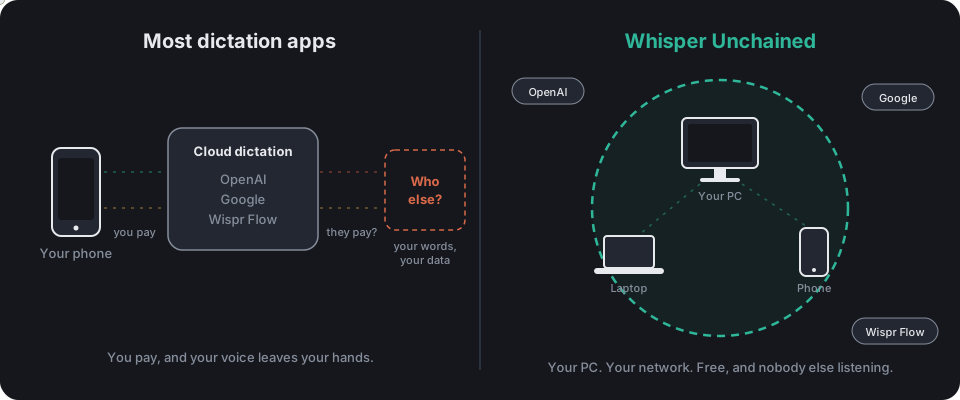
There are plenty of Whisper wrappers out there. This one does the whole job: it runs on your own PC, on another PC of yours, or with your own cloud key. It comes with a Windows installer and a phone app that dictates into any app. Most of what the paid apps charge for is here, free.
Three ways to run it
Pick one in the installer and change it any time in Settings.
On this PC
Whisper runs on your own graphics card, or the processor if you don't have one. Nothing leaves your PC. The installer picks the best model for your card.
On another PC of yours
A PC in your home that already runs Whisper Unchained Server does the work. Good for laptops and small PCs.
A cloud service
Groq, OpenAI or any OpenAI-compatible service, with your own API key. In this mode the audio does leave your PC, and goes to the service you chose.
What you get
The parts people pay monthly for elsewhere.
- Dictate anywhere on WindowsPress the hotkey, talk as long as you like, press it again. The text is pasted where your cursor is. The default key is the backtick, the one under Esc that nobody uses.
- Your phone as a microphoneThe Android app shows a small floating button whenever a text box is selected. Tap, talk, tap again, and the text goes into the box. Pair it with your PC by scanning a QR code.
- "Prompt AI" voice commands"The meeting moved to noon. Prompt AI, make this formal." Your own AI model (Ollama, LM Studio, llama.cpp and others, found automatically) applies the instruction.
- Optional AI cleanupRemoves filler words, applies "Tuesday, no wait, Wednesday" corrections, and follows a spoken "new paragraph". You choose the punctuation, rewording and tone.
- Your words, spelled rightA shared vocabulary and "heard as, write as" name corrections, used by the PC and the phone alike.
- Away from homeWith Tailscale (free, and the installer offers it) your phone reaches your PC from anywhere, without opening ports.
- Gaming friendlyGame mode frees the graphics card while a game runs and picks back up after.
- Right-click to transcribeRight-click any audio or video file in File Explorer to copy its text. Also works inside Chrome Remote Desktop.
Fast on ordinary hardware
Measured with the large-v3-turbo model on an RTX 2070 Super and a $12 used USB microphone. Smaller cards and PCs without one get a smaller model automatically.
Download
Both are early preview builds and free. No account, no sign-up.
Whisper Unchained Server
The server, hotkey and tray app. The installer sets up its own private copy of Python and NVIDIA's libraries, picks a model for your card, and checks everything works. No admin rights needed for the install itself.
Needs about 3 GB of disk space. An NVIDIA card with 4 GB or more of video memory gets the recommended model.
Whisper Unchained for Android
A floating microphone button that dictates into any app, using your PC or your own cloud key. A Google Play listing is on the way.
The installer isn't code-signed yet, so Windows shows "Windows protected your PC" the first time: click More info, then Run anyway. Android asks you to allow installs from your browser.
For developers: an OpenAI-compatible API
The server listens on port 5000 and speaks OpenAI's transcription API, so apps and scripts that already use OpenAI can point at your own PC instead.
curl -F file=@clip.wav -F response_format=text \
http://127.0.0.1:5000/v1/audio/transcriptions| Endpoint | What it gives you |
|---|---|
/v1/audio/transcriptions | OpenAI-compatible transcription, with optional AI cleanup and voice commands |
/transcribe_time_stamped | Text with segment times, for subtitles and captions |
/transcribe_words | The time each word was spoken, with Whisper's confidence per word |
/v1/vocabulary | The shared word list the PC and phone both use |
/health | Status check that never needs a key |
An API key is optional and off by default. The full list is in the README.
Code signing policy
Windows installers are built by GitHub Actions from the public repository, never on a personal PC. We have applied to the SignPath Foundation for free code signing through SignPath.io. Once approved, only installers built by that workflow from a tagged commit will be signed.
| Role | Who |
|---|---|
| Committers and reviewers | Dominic-Shirazi |
| Approvers | Dominic-Shirazi |
Everyone in these roles uses multi-factor authentication on GitHub and SignPath. The program sends nothing anywhere unless you set it up to; see the privacy policy. Full text: CODE_SIGNING_POLICY.md.